Victim: "Hi. I've got some sort of redirect bug that I can't get rid of. When i click on a link in a website, I get redirected to fal.apostrophechanges.com, which is a pornographic site. I have the K9 filter, so it blocks the site from appearing, but it's getting really annoying. In addition, I am afraid that my private info might somehow be compromised. I've tried anti-virus scans, I used Malwarebytes, and I don't see any unusual programs in my computer..."
Download SpyHunter to Remove Virus Easily

Wednesday, June 22, 2016
Removal Guide for Fal.apostrophechanges.com Hijacker - How to Delete Annoying Pop-up!
Have you ever encountered the same situation like this?
Victim: "Hi. I've got some sort of redirect bug that I can't get rid of. When i click on a link in a website, I get redirected to fal.apostrophechanges.com, which is a pornographic site. I have the K9 filter, so it blocks the site from appearing, but it's getting really annoying. In addition, I am afraid that my private info might somehow be compromised. I've tried anti-virus scans, I used Malwarebytes, and I don't see any unusual programs in my computer..."
Victim: "Hi. I've got some sort of redirect bug that I can't get rid of. When i click on a link in a website, I get redirected to fal.apostrophechanges.com, which is a pornographic site. I have the K9 filter, so it blocks the site from appearing, but it's getting really annoying. In addition, I am afraid that my private info might somehow be compromised. I've tried anti-virus scans, I used Malwarebytes, and I don't see any unusual programs in my computer..."

Thursday, April 21, 2016
Cannot Uninstall Ads by Zinc? Manual Removal and Automatic Removal Solution Here!
When you find that your browser is popping up Ads by Zinc, you should know that undoubtedly the browser is infected an unwelcome Adware - Ads by Zinc.
As adware, Ads by Zinc brings multiple pop-up advertisements designed by the third party, in the hope of earning money with tons of commercial ads appearing on your computer screen.
Zinc Ad ad-supported program does pretty well in playing havoc and screwing up things that it is able to claim itself to be a normal plug-in/extension, while the fact is that Ads by Zinc is created to have sufficient skills to meddle in your browsing session could drive you buggy soon once it gets intrusion into your computer.
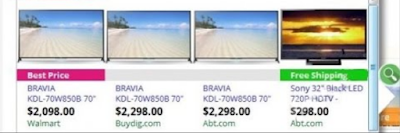
As adware, Ads by Zinc brings multiple pop-up advertisements designed by the third party, in the hope of earning money with tons of commercial ads appearing on your computer screen.
Zinc Ad ad-supported program does pretty well in playing havoc and screwing up things that it is able to claim itself to be a normal plug-in/extension, while the fact is that Ads by Zinc is created to have sufficient skills to meddle in your browsing session could drive you buggy soon once it gets intrusion into your computer.
Monday, March 14, 2016
How to Remove Trojan:Win32/Moscupin.A and Trojan: Win32/CoinMiner From Computer Completely?
Brief Introduction of Trojan:Win32/Moscupin.A and Trojan: Win32/CoinMiner
Trojan:Win32/Moscupin.A and Trojan: Win32/CoinMiner is classified as Trojan horse that is designed by the hidden techniques and activates itself after installing it automatically in the compromised system. It is tricky that usually hides in spam email attachments, hacked/compromised websites or malicious links, etc.
Friday, March 11, 2016
How to Get Rid of Live.safesystemupdate.online Pop-up? - Fake Update Removal Guide
What is Live.safesystemupdate.online?
Live.safesystemupdate.online is a malicious domain which is developed to promote potentially unwanted programs or rogue software. And the live.safesystemupdate.online pop-up might be caused by adware that often infiltrate your PC without knowledge and permission. If your computer is also infected, you may get such pop-up like below:
Thursday, March 10, 2016
Completely Remove Qnq.system.fusilier.me Pop-up From Web Browsers
What is Qnq.system.fusilier.me?
Qnq.system.fusilier.me is a redirect domain that developed by creators to generate traffic to their sites by keeping you directing to its or related websites. In details, it is used to gather your search terms and redirect you to websites from where they can get revenue. And the endless pop-up is mainly caused by an adware or potentially unwanted program that has installed on your computer without your knowledge.
Wednesday, March 9, 2016
How to Remove HELP_YOUR_FILES.PNG - (CryptoWall 4.0 Ransomware) Removal Instruction
Know About HELP_YOUR_FILES.PNG
HELP_YOUR_FILES.PNG is actually another file-encryption release from the developers of CryptoWall ransomware. In the latest 4.0 version of CryptoWall ransomware the victims are told to pay 1.79 BTC (Bitcoins) to recover their encrypted personal data. One of the corresponding document titled "HELP_YOUR_FILES.PNG" which holds these instructions, gets added to every folder with affected items and placed on your desktop. So you may be informed by the message listed below once infected.

Monday, March 7, 2016
How to Remove 'Easy Search' From Chrome/Firefox/IE Completely?
Recently, more and more computer users complaint that they were plagued with 'Easy Search'. For example, there is one of victim:
"Yesterday I noticed I'd somehow gained an unwanted app on my chrome browser on my windows computer -'Easy Search'. Every time I try search for something in the search bar it gives me useless search results and lots of pop ups etc..."
Easy Search is an unwanted search bar that can give you useless search results and lots of pop ups. Actually, it is classified as a browser hijacker which is capable of modifying browser default settings so as to launch itself every you open a browser or a new tab. It is developed to increase web traffic and generate pay-per-click revenue by distribute various unwanted commercial ads.
Easy Search often bundled with some free programs/applications and install along with them. But the thing is that most users are not attentive to the installation process, that is why Easy Search often install as an unwanted program. Sometimes it can be browser plugins or add-ons that cause this problem.
After invading your PC, Easy Search will provide you with nothing helpful but give you numerous troubles.
Method one : Remove Easy Search manually.
Method two: Get rid of Easy Search automatically by SpyHunter removal tool.

Step 1: Remove Easy Search and other suspicious programs from Control Panel.
Start > Control Panel > Uninstall Programs > select Easy Search and remove it.
Step 2: Remove Easy Search and other suspicious extensions or add-ons from browsers.
From IE:
1. Tools > Manager add-ons > Extension
2. Find the extensions and disable it.
From Google Chrome:
1. Customize and control Google Chrome > More Tools > Extensions
2. Select the extensions and disable it.
From Mozilla Firefox:
1. Open menu > Add-ons > Extensions
2. Find the extensions and remove it.
Step 3: Reset browser homepage.
From IE:
Tools > Internet options > General > Delete
From Google Chrome:
Customize and control Google chrome > Settings > select Set page
From Mozilla Firefox:
Open menu > Options > General > find Home Page and reset it
Step 4: Start Registry and delete relevant entries under the paths below.
1. Windows + R > input “regedit” to open Registry.
2. Delete the infected as well as suspicious (activated lately) files under the roots below.
HKEY_CURRENT_USER\Software\Microsoft\Windows\CurrentVersion\Run
HKEY_CURRENT_USER\Software\Microsoft\Windows\CurrentVersion\InternetSettings “CertificateRevocation” = 0
HKEY_CURRENT_USER\Software\Microsoft\Windows\CurrentVersion\Policies\System “DisableTaskMgr” = 1
HKEY_LOCAL_MACHINE\SOFTWARE\Microsoft\Windows\CurrentVersion\policies\system “DisableTaskMgr” = 1
Step 5: Delete relevant files from computer system.
If you feel the manual steps is little complicated to follow, there is a quick and effective way that you can follow: Download SpyHunter Removal Tool to get rid of this kind of computer infection automatically.
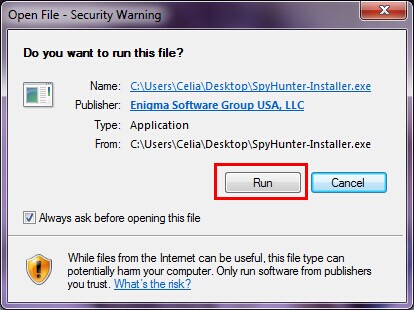
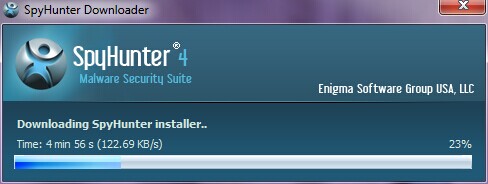
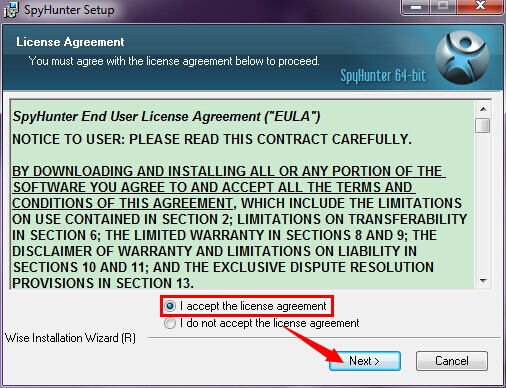
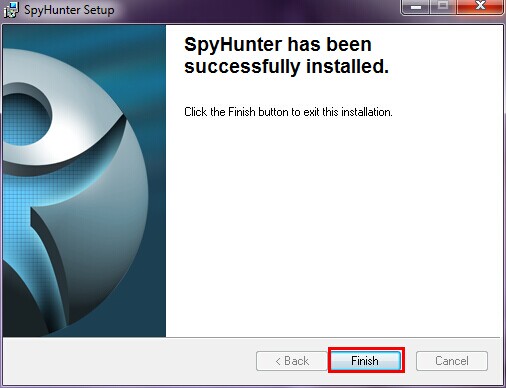
Step 1: download and install Spyhunter on your computer.
Please click the download icon and follow the instruction to install.

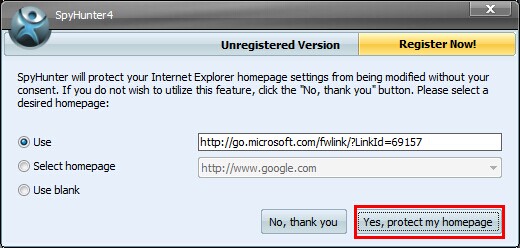
Step 2: click " Yes, protect my homepage" to protect your browser.
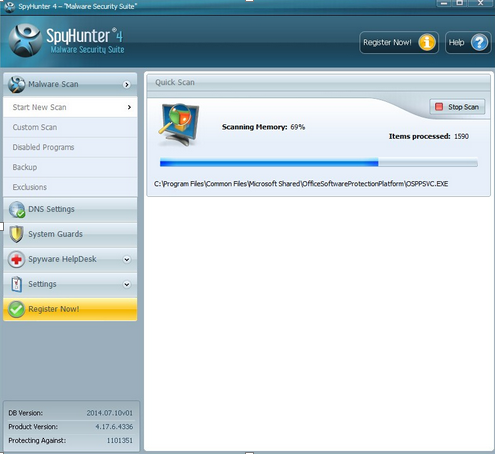
Step 3: Click "Scan Now" to scan your computer to block Easy Search.
Malware prevention and removal is good. But when it comes to computer maintenance, it is far from enough. To have a better performance, you are supposed to do more works. If you need assistant with windows errors, junk files, invalid registry and startup boost etc, you could use RegCure Pro for professional help.
Step 1. Download PC cleaner RegCure Pro
a) Click the icon below to download RegCure Pro automatically

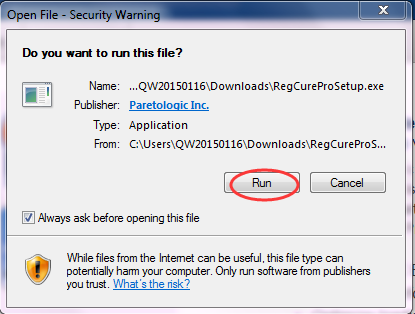
b) Follow the instructions to finish RegCure Pro installation process
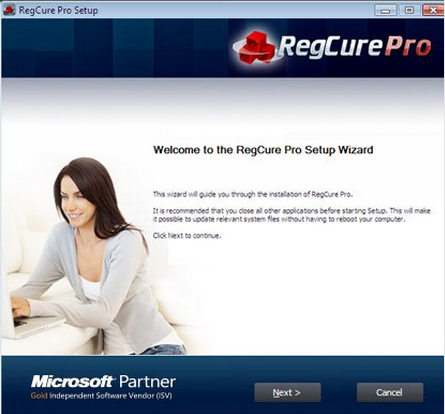
Step 2. Run RegCure Pro and start a System Scan on your PC.

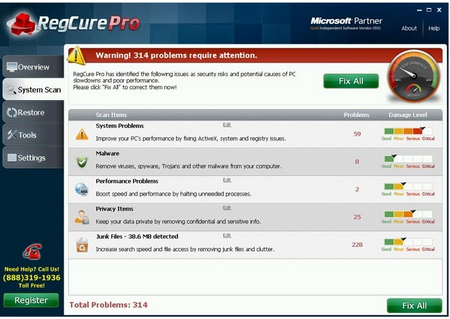
Step 3. Use the in-built “Fix All" scheduler to automate the whole optimization process.
"Yesterday I noticed I'd somehow gained an unwanted app on my chrome browser on my windows computer -'Easy Search'. Every time I try search for something in the search bar it gives me useless search results and lots of pop ups etc..."
What is 'Easy Search' Actually?
Easy Search is an unwanted search bar that can give you useless search results and lots of pop ups. Actually, it is classified as a browser hijacker which is capable of modifying browser default settings so as to launch itself every you open a browser or a new tab. It is developed to increase web traffic and generate pay-per-click revenue by distribute various unwanted commercial ads.
Easy Search often bundled with some free programs/applications and install along with them. But the thing is that most users are not attentive to the installation process, that is why Easy Search often install as an unwanted program. Sometimes it can be browser plugins or add-ons that cause this problem.
After invading your PC, Easy Search will provide you with nothing helpful but give you numerous troubles.
- It may take control of your popular web browsers by modifying the default settings.
- It may redirect you to other unknown or unwanted websites without your consent.
- It may disconnect your web-surfing ability from many Internet browsing services.
- It may display various unwanted pop-up ads and trick you into paying for useless software.
- It slows down your PC performance and make its operation frustrating.
- It may be able to generate more security bugs on your PC and allow other threats to attack your system remotely.
- It may track your browser histories and even collect your sensitive information for the purpose of making profits.
Easy Search Removal Instruction Step by Step
Method one : Remove Easy Search manually.
Method two: Get rid of Easy Search automatically by SpyHunter removal tool.
Method one : Remove Easy Search manually.
Step 1: Remove Easy Search and other suspicious programs from Control Panel.
Start > Control Panel > Uninstall Programs > select Easy Search and remove it.
Step 2: Remove Easy Search and other suspicious extensions or add-ons from browsers.
From IE:
1. Tools > Manager add-ons > Extension
2. Find the extensions and disable it.
From Google Chrome:
1. Customize and control Google Chrome > More Tools > Extensions
2. Select the extensions and disable it.
From Mozilla Firefox:
1. Open menu > Add-ons > Extensions
2. Find the extensions and remove it.
Step 3: Reset browser homepage.
From IE:
Tools > Internet options > General > Delete
From Google Chrome:
Customize and control Google chrome > Settings > select Set page
From Mozilla Firefox:
Open menu > Options > General > find Home Page and reset it
Step 4: Start Registry and delete relevant entries under the paths below.
1. Windows + R > input “regedit” to open Registry.
2. Delete the infected as well as suspicious (activated lately) files under the roots below.
HKEY_CURRENT_USER\Software\Microsoft\Windows\CurrentVersion\Run
HKEY_CURRENT_USER\Software\Microsoft\Windows\CurrentVersion\InternetSettings “CertificateRevocation” = 0
HKEY_CURRENT_USER\Software\Microsoft\Windows\CurrentVersion\Policies\System “DisableTaskMgr” = 1
HKEY_LOCAL_MACHINE\SOFTWARE\Microsoft\Windows\CurrentVersion\policies\system “DisableTaskMgr” = 1
Step 5: Delete relevant files from computer system.
Method two: Get rid of Easy Search automatically by SpyHunter removal tool.
If you feel the manual steps is little complicated to follow, there is a quick and effective way that you can follow: Download SpyHunter Removal Tool to get rid of this kind of computer infection automatically.
Step 1: download and install Spyhunter on your computer.
Please click the download icon and follow the instruction to install.
Step 2: click " Yes, protect my homepage" to protect your browser.
Step 3: Click "Scan Now" to scan your computer to block Easy Search.
Optional solution: use RegCure Pro to optimize your PC.
Step 1. Download PC cleaner RegCure Pro
a) Click the icon below to download RegCure Pro automatically
b) Follow the instructions to finish RegCure Pro installation process
Step 2. Run RegCure Pro and start a System Scan on your PC.
Step 3. Use the in-built “Fix All" scheduler to automate the whole optimization process.
Important to Know:
It's necessary to download and install antivirus program to protect your computer from virus in the future (Download and Install Spyhunter to terminate Easy Search) and get your clean computer back! Please scan your PC regularly to ensure it's not infected.
It's necessary to download and install antivirus program to protect your computer from virus in the future (Download and Install Spyhunter to terminate Easy Search) and get your clean computer back! Please scan your PC regularly to ensure it's not infected.
Friday, March 4, 2016
How to Remove Win32-mse-fixes.com Pop-up Alert Completely? - Tech Support Scam Removal
What is Win32-mse-fixes.com?
Win32-mse-fixes.com is actually a scam site which is developed to promote fake and paid tech support services and products. And the endless pop-up is mainly caused by an adware that has installed on your computer without your knowledge and permission. It can affect all your common browsers such as Internet Explorer, Google Chrome and Mozilla Firefox. You should never take it slightly.
Wednesday, March 2, 2016
Completely Uninstall MPC Cleaner From Computer With Best Method
A complaint about MPC Cleaner:
Victim: "How do I get rid of this awful malware software program? I don't see it listed in the add remove programs page on my pc and when I go online for advice I get steered towards another program to buy. I'm sure AVG has a way to iradicate this virus, please help"
Know About MPC Cleaner
MPC Cleaner is promoted as the world’s most lightweight and reliable cleanup assistant that is supposed to clean your registry and optimize your system. However, it can be deemed as a Rogue Software/PUP (potentially unwanted program).
Completely Remove Messagefrombrowser.info Pop-up Fake
What is Messagefrombrowser.info?
Messagefrombrowser.info is a phishing site developed by cyber criminal to trick inexperience users into purchasing expensive spam tech support and rogue antivirus software via popping up fake alert/warning. If this messagefrombrowser.info pop-up page constantly appears on your webpage, it means that your system might be at risk.
Monday, February 29, 2016
How to Remove A1.helpcustomeronline.com Pop-up Fake System Alert Completely.
Victim: "The website generating the Security error is a1.helpcustomeronline.com. I found it is located on a godaddy server in scottsdale, az. ip is 166.62.97.136....I don't have a picture because they got it on their computer and I was busy stopping it. It wasn't hard to stop. I stopped the google chrome process using task manager and then cleaned out the cache and history. Malwarebytes found nothing. But there is no info that this is a bad site."
A1.helpcustomeronline.com is a phishing domain developed by cyber criminal to scare computer users with fake system alert and then cheat their money by asking them to call the relevant technician to get support. And the unstoppable pop-up from a1.helpcustomeronline.com is mainly caused by an adware that has installed on your computer without notification. You should never be tricked.
Know More About A1.helpcustomeronline.com
A1.helpcustomeronline.com is a phishing domain developed by cyber criminal to scare computer users with fake system alert and then cheat their money by asking them to call the relevant technician to get support. And the unstoppable pop-up from a1.helpcustomeronline.com is mainly caused by an adware that has installed on your computer without notification. You should never be tricked.
Sunday, February 28, 2016
How to Remove Generous Deals Permanently From Web Browsers?
What is Generous Deals? Is it Useful?
Generous Deals is deemed as an adware program that is often embedded on your browsers like Internet Explorer, Google Chrome and Mozilla Firefox as an free extension. Usually, it comes bundled with free downloads from third-party sites. Besides, it may also spread via spam email attachments, corrupted websites, malicious links, etc.
Thursday, February 25, 2016
Need Help on Removing Gstatic.com Pop-up Completely And Permanently
Victim: "Been getting Gstatic.com popup which is slowing down and who knows what else on my computer. Does anyone know about this gstatic virus and if AVG can remove it or other solution??"
Gstatic.com is deemed as a redirect domain that keeps popping up and redirect user's browser webpage to insecure websites that display unwanted ads or misleading message to entice them. It can be compatible with your popular web browsers such as Internet Explorer, Google Chrome and Mozilla Firefox by changing the default settings without knowledge and permission.
What is Gstatic.com?
Gstatic.com is deemed as a redirect domain that keeps popping up and redirect user's browser webpage to insecure websites that display unwanted ads or misleading message to entice them. It can be compatible with your popular web browsers such as Internet Explorer, Google Chrome and Mozilla Firefox by changing the default settings without knowledge and permission.
Wednesday, February 24, 2016
How Can I Remove "online map finder my way" From Completely And Permanently?
Description of "online map finder my way"
"online map finder my way" is classified as a potentially unwanted program and adware program that developed for the purpose of making profits by releasing numerous unwanted ads and pop-ups. It attempts to mislead you to be the target of those internet sales. Your visit and purchase will bring network traffic or money to it. It usually comes bundled with different free software downloaded from third-party websites infect your PC without your consent and knowledge.
Tuesday, February 23, 2016
Effective Methods to Remove Findweeflowpoblem.space Pop-up Completely - Fake Alert Removal
What is findweeflowpoblem.space? Is it Harmful?
Findweeflowpoblem.space is an ad-support site that can bother you with endless pop-up ads. If you keeps getting unstoppable findweeflowpoblem.space pop-ups, it means that your computer may has infected with an adware that has installed on your computer without your knowledge and permission. It may come into your PC bundled with free software downloaded from third-party site. Besides, it may also infect via corrupted websites, malicious links and spam emails, etc.
Monday, February 22, 2016
How to Get Rid of 1-877-284-6789 Phone Scam Completely? - Tech Support Scam Removal
Recently, some computer users stating that they keep receiving a pop-up with malware alert and then a suspected phone number 1-877-284-6789 was sent to call. Is it a genuine phone number? How to stop the unstoppable pop-up? Keep reading and you will get the answers.
1-877-284-6789 pop-up is likely to be caused by an adware that has installed onto your computer without your knowledge and permission. In fact, it is a scam developed by cyber criminal to diddle victims out of their money via popping up fake alerts to scare them and tricking them to call the scam number for help. You should never be tricked.
More Knowledge About 1-877-284-6789 Pop-up
1-877-284-6789 pop-up is likely to be caused by an adware that has installed onto your computer without your knowledge and permission. In fact, it is a scam developed by cyber criminal to diddle victims out of their money via popping up fake alerts to scare them and tricking them to call the scam number for help. You should never be tricked.
Sunday, February 21, 2016
How to Get Rid of Q.adrta.com Pop-up From Computer Completely?
What is A.adrta.com? Is it Harmful?
Q.adrta.com is an ad-support site that can compromise many famous web browsers such as Internet Explorer, Mozilla Firefox, Google Chrome, and Microsoft Edge. It is unwanted that designed to promote its sponsored products, linked websites or distribute other spam. It may come into your PC bundled with free downloads from third-party sites without your knowledge. Besides, it may also spread via malicious links, corrupted websites, spam email attachments, etc.
Thursday, February 18, 2016
Completely Remove Ads by Enhanced Shopping Assistant From Web Browsers
Brief Introduction of Enhanced Shopping Assistant
Enhanced Shopping Assistant is an ad-support program that can be deemed as an adware or a potentially unwanted program. It usually comes bundled with your free downloads from third-party sites. It may hide itself in main software to bypass your attention. That's why so many users have no idea how and when it infiltrate their PC. It can be attached as a browser extension to your popular browsers such as Internet Explorer, Mozilla Firefox and Google Chrome.
How to Remove Yousofterty.com Pop-up? - “Your Download is Ready” Pop-up Removal Guide
What is Yousofterty.com? Is it Trusty?
Yousofterty.com is a dubious website that is generated by Adware or PUP that hijacks your web browser with nasty plugin. It is developed to promote unwanted or fake programs or other products. It can affect all your popular browsers such as Internet Explorer, Mozilla Firefox and Google Chrome. You should never be tricked.
Wednesday, February 17, 2016
How to Remove Alwaysnewsoft.traffic-portal.net Pop-up Completely And Safely?
Victim: "I accidentally infected my Mac Pro with the "alwaysnewsoft" dot "traffic-portal" dot "net" adware/malware, which blocks me from using Safari unless I click OK on an alert that I'm not willing to touch. Does anybody know how to remove it? Googling the issue only turns up Windows solutions, and almost all of them are from apparently shady malware removal companies."
What is Alwaysnewsoft.traffic-portal.net?
Alwaysnewsoft.traffic-portal.net is a suspected domain that is able to cause browser redirects. The redirects may lead to ad-supported or online shopping sites, potentially malicious and phishing sites. It can affect your popular browsers including Internet Explorer, Mozilla Firefox and Google Chrome. You should never take it slightly.